[TOC]
项目里有一部分材质在切换到 Mobile Preview 后,会在进入渲染阶段时崩溃。
崩溃时日志会出现如下报错:
error X8000: D3D11 Internal Compiler Error: Invalid Bytecode: Incompatible min precision type for operand #1 of opcode #233 (counts are 1-based). Expected int or uint.
要复现这个 Bug,虚幻版本需要在 5.5 及以后,并且必须包含
https://github.com/EpicGames/UnrealEngine/commit/77ae86207ab4270c2030828002d8e732e37fbfb1
这个提交。
原因
其实这个提交里已经包含了对部分可能触发该 Bug 情况的处理,但还遗漏了 LocalVertexFactory。
虚幻在编译 Mobile Preview 的 shader 时,会先走 DX11 的 fxc.exe。如果 fxc.exe 编译失败,就会回退到 dxc.exe -> SPIR-V -> HLSL -> fxc.exe 这条编译路径。
具体可以见
// Generate the dumped usf file; call the D3D compiler, gather reflection information and generate the output data
static bool CompileAndProcessD3DShaderFXCExt(
	uint32 CompileFlags,
	const FShaderCompilerInput& Input,
	const FString& PreprocessedShaderSource,
	const FString& EntryPointName,
	const FShaderParameterParser& ShaderParameterParser,
	const TCHAR* ShaderProfile, bool bSecondPassAferUnusedInputRemoval,
	TArray<FString>& FilteredErrors, FShaderCompilerOutput& Output)
而 fxc.exe 对 min16 类型的支持比较有限,shader 稍微复杂一点就可能因为优化失败而无法编译。所以如果 shader 写得比较复杂,就很容易触发第二条路径。
当使用 dxc 编译时,虚幻会尝试不启用 half 类型,生成的 SPIR-V 会是全精度。
具体代码在
			// Compile HLSL source to SPIR-V binary
			CrossCompiler::FShaderConductorOptions Options;
			// 	Options.bEnable16bitTypes 的默认值是false
			Options.bWarningsAsErrors = Input.Environment.CompilerFlags.Contains(CFLAG_WarningsAsErrors);
			Options.bPreserveStorageInput = true; // Input/output stage variables must match
			if (bHlslVersion2021)
			{
				Options.HlslVersion = 2021;
			}

			FSpirv Spirv;
			if (!CompilerContext.CompileHlslToSpirv(Options, Spirv.Data))
			{
				CompilerContext.FlushErrors(Output.Errors);
				return false;
			}
Bug 源头
在 LocalVertexFactoryCommon.ush 里有这么一段:
struct FVertexFactoryInterpolantsVSToPS
{
	TANGENTTOWORLD_INTERPOLATOR_BLOCK

#if INTERPOLATE_VERTEX_COLOR
	half4	Color : COLOR0;
#endif
	...
}
当 PS 走了上面的回退路径后,会触发全精度编译。
此时 VS 生成的插值结构中的 COLOR 是 half4 精度,而 PS 的插值结构是 float4 精度。两边各自都是合法的 Shader,但在创建 PSO、将 VS/PS Link 到一起时,会因为 Signature 不匹配而链接失败,从而触发编辑器崩溃。
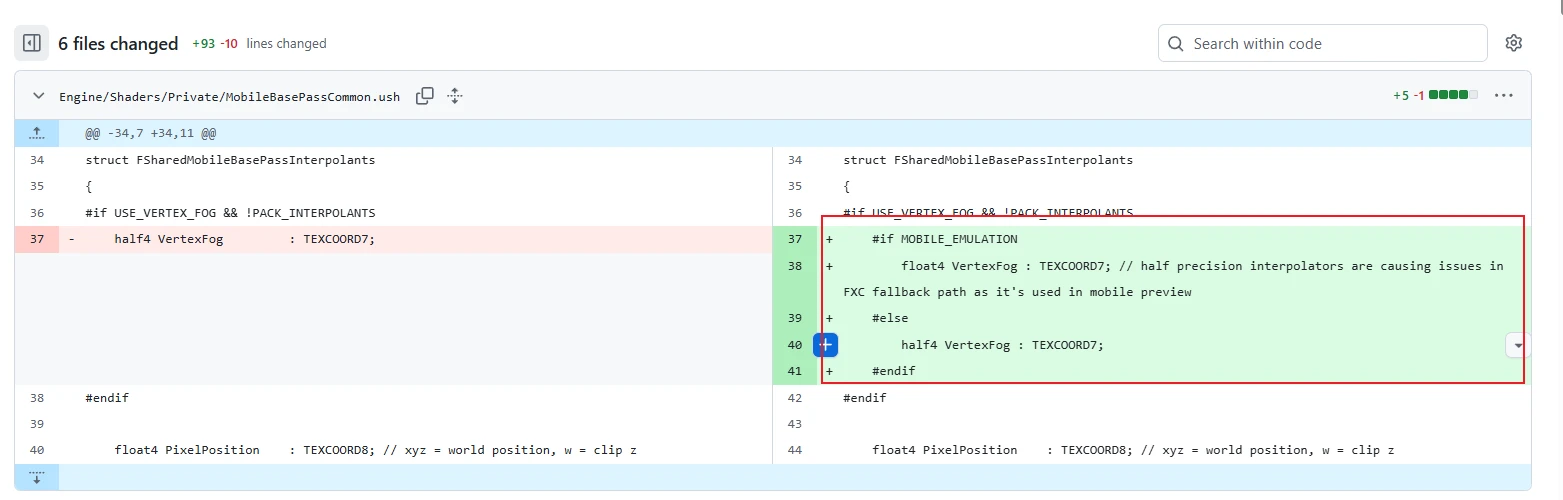
我给 Epic 提了一个 PR,看看能不能合进去。 Fix the issue where materials using Vertex Color could trigger a crash after FXC compilation fails in Mobile Preview. by BlurryLight · Pull Request #14520 · EpicGames/UnrealEngine